
Most call dashboards were designed for a room full of people: calls per agent, talk time, average handle time, a leaderboard. Then an AI voice agent starts making the first call to every lead and answering the phone after 7pm, and half those numbers stop meaning anything.
The AI does not have a talk-time target. It does not need a leaderboard. What you need to know is whether it is reaching people, what it is hearing, when it hands over, and whether any of that is turning into pipeline. That is AI call analytics — and it only works if the AI's calls, your team's calls and your WhatsApp conversations are counted in the same place.
Why the dashboard has to be unified
The usual setup is a dialler report, a WhatsApp report, a CRM pipeline report and, now, an AI vendor's dashboard. Four tools, four definitions of "contacted", and a Monday meeting spent reconciling them instead of deciding anything.
A unified CRM dashboard fixes that by counting from one record. When the AI agent calls a lead, the outcome lands on the contact. When a campaign moves that lead to Qualified, the funnel moves with it. When the lead replies on WhatsApp instead, the same record shows it. Nothing needs reconciling, because there is only one thing being counted.
The six things AI call analytics should show
1. Whether the system is alive
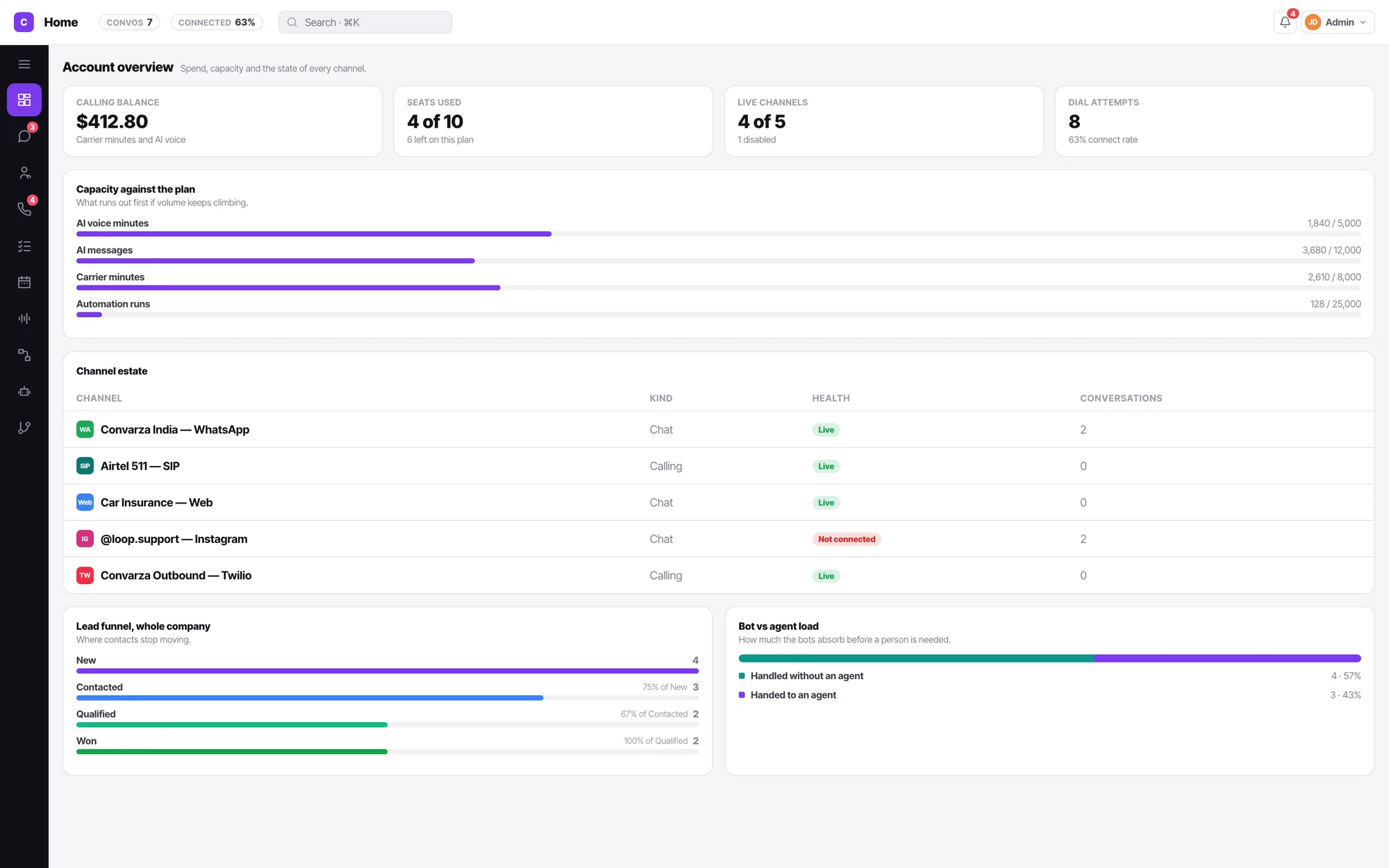
Before any performance number: are the phone lines connected, is the calling balance enough for this week, is anything about to run out? A disconnected channel looks exactly like a quiet week. Reading the Home overview.
2. Reach: who you actually spoke to
Dial attempts with the connect rate beside them, missed inbound calls, and how many calls arrive out of hours. Connect rate is about your list and the number you dial from — a better script cannot fix it. Why missed calls are the biggest leak.
3. What each call was about, and how it ended
This is where AI calls give you more than human ones ever did. Every AI call ends with an outcome, a transcript or summary, an intent tag and a sentiment score — for every call, not the handful a manager has time to listen to. Read the outcome mix as a whole: a rising share of "wrong number" is a data problem; a rising share of "not interested" is a targeting problem. Neither is fixed by editing the AI.
4. AI versus your team
How many conversations the AI handled without a person, and how many it handed over. There is no correct number. An AI that never hands over may be excellent — or may be trapping every difficult caller. Read ten handovers before you celebrate the percentage. Reading bot versus agent load.
5. What it did to the pipeline
The lead funnel — New, Contacted, Qualified, Won — read as ratios between stages, not counts. New to Contacted is speed: an AI agent should lift it within a week. Contacted to Qualified is the script and the targeting. Qualified to Won is your sales team. Reading the lead funnel.
6. What runs out first
AI voice minutes, carrier minutes, AI chat messages and automation runs are four different meters, and a busy campaign spends them at different rates. Know which one binds before you launch, not at 40% progress. Capacity against the plan.
Campaign analytics: two ratios, never one
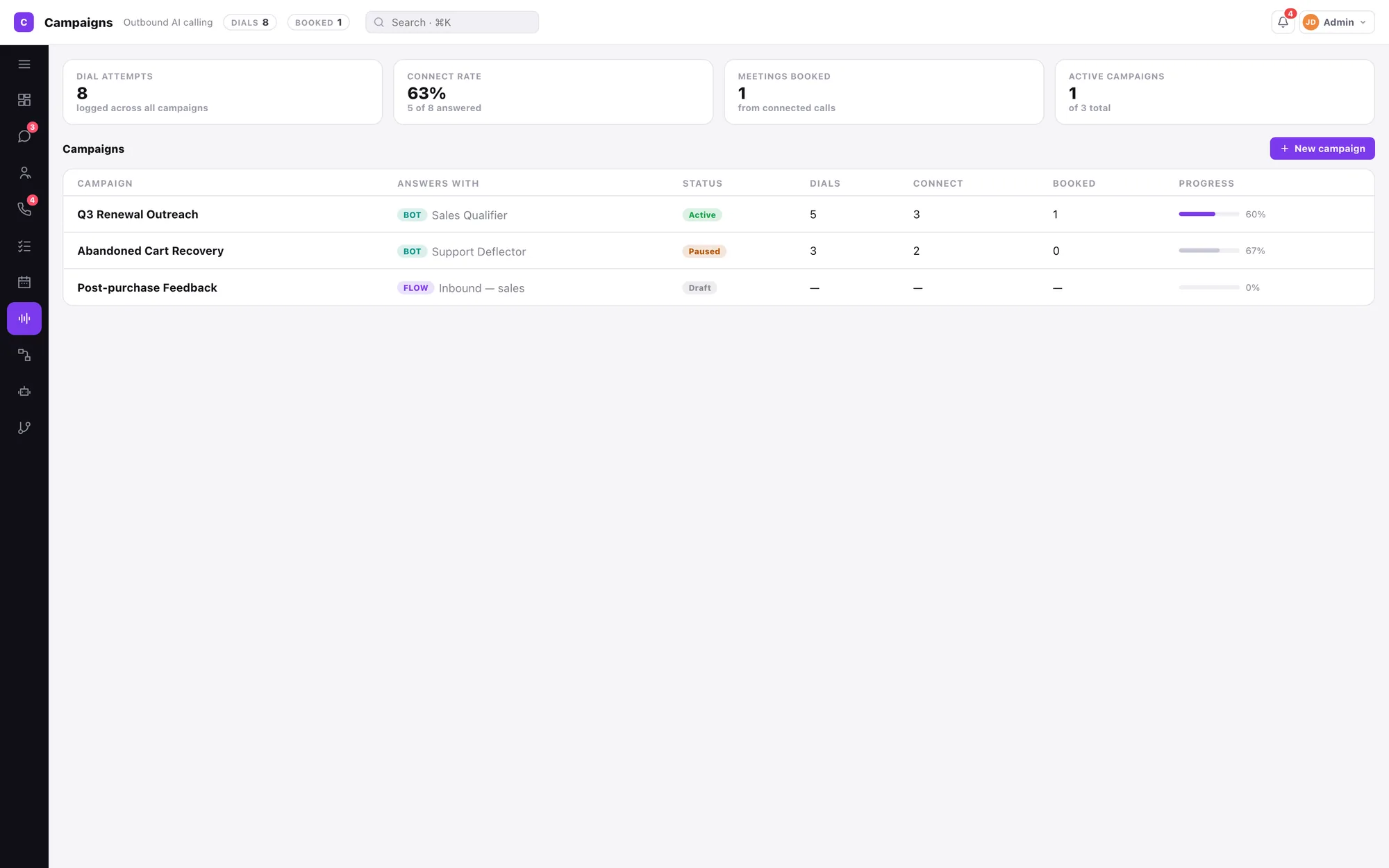
For outbound AI calling, the single most useful habit is refusing to look at one blended "conversion rate". Split it:
- Connects over dials — your list and your number.
- Bookings over connects — your AI agent's script and your offer.
Fix the first before touching the second. And when a campaign switches channels — call, then WhatsApp, then email — compare connect rate on the calls with reply rate on the messages. If calls go unanswered but WhatsApp replies are healthy, that is a finding about where this audience lives. Reporting on campaigns.
Numbers that mislead once AI is calling
- Total call volume. It rises when things go well and when they go badly. On its own it says nothing.
- "AI containment rate" as a target. Optimise it and you get an AI that will not let people reach a person.
- Average talk time. A good AI call is often a short one. A long one may be a caller trying to get a straight answer.
- One response time across channels. WhatsApp is measured in minutes, email in hours. An average across both describes nothing.
A thirty-minute Monday review
- Five minutes on health: channels live, calling balance, capacity.
- Five on reach: missed inbound, connect rate, out-of-hours volume.
- Ten on transcripts: read five handovers and five calls with a poor outcome. Metrics tell you something is wrong; transcripts tell you what.
- Five on the funnel: find the biggest drop between two stages.
- Five deciding one change — to the list, the script or the handover rules — and writing it down so next Monday can tell you if it worked.
For the general call metrics behind this, see the five call metrics worth a dashboard.
How the Convarza AI dashboard brings it together
Insights is the home screen in Convarza AI, because the first question every morning is the same one. It shows conversation count and connect rate in the header, then the calling balance, seats, live channels, capacity against your plan, the channel estate, the lead funnel and bot versus agent load — read off the same records your team works in, and filtered by each person's role.
Behind every number is a contact: each AI call lands on the record with outcome, transcript, recording, intent and sentiment, and outcomes move lead stages automatically, so campaign results appear in the funnel without reconciliation. When a question needs more than a card can show, admins export any segment to Excel with its activity history. If you also run HubSpot, Zoho, Pipedrive or Freshworks, AI calls are logged there too. How contacts and lead stages work.
Want to see the AI side first? Read AI telecalling or what an AI CRM actually does.